
You’re generating a video using an AI text-to-video application. You write a gorgeous prompt. It specifies moody lighting, slow camera push, and a character who emotes. You spend your credits, wait a few minutes, and get back something that looks like a trailer for a mystery product you’ve never heard of.
That’s roughly what happened to one customer on their first try with Adobe Firefly. Nothing from the prompt made it into the clip. Nothing. I chuckled when I read it, because I’ve been there.
It makes paying users want to throw their monitors to the floor and wonder where the AI world is heading.
Why does this happen?
Why First Results Disappoint
Ironically, being complete in your prompt is not always the right solution. Often, the more you ask for, the higher chance the model might misread you.
Picture a scene with five people, a moving camera, and dialogue. Turning that into a video is not just one request. It’s a dozen requests running at once, and if one request drifts, the whole scene wobbles. Somebody’s hand melts. The camera goes to the wrong place. Dialogue goes nowhere.
Image-to-video has its own trap. A reference image may lock in how things look, which is great. But it says nothing about how the hands should move, how the lighting changes later, or where the camera ends up. The model fills in the blanks, and it doesn’t ask your permission. It just guesses, and sometimes it guesses wrong.
And then there’s the training bias. These models lean hard on how the real world behaves. Ask for something physically impossible and the result looks “uncanny,” like a dream you once had that makes no sense when you wake up. To be fair, it might be kind of what you asked for.
Why Your Instructions Get Ignored
Overloaded prompts are the main culprit. In one review, Kling AI gave up true prompt adherence in exchange for smooth motion and consistency over time, when instructions piled up. In other words, the model had to choose, and it didn’t choose you.
The failures repeat so often, they’ve become a standard lineup of “likely suspects”: missing objects, wrong motion, miscounted people (ask for three, get four), and characters whose faces slowly turn into someone else’s.
Here’s a wrinkle I didn’t expect. A clip can follow your prompt and still be unusable. Everything you asked for is technically there, and it’s still garbage. Adherence and usability aren’t necessarily the same thing.
I learned this firsthand with my own image-to-video experiment. I had a still image of a statue, and I wanted it to come alive. My early prompts asked for specific animated movements, and the model either ignored them or turned them into something wild. The problem was me. I’d crammed a whole sequence into one prompt and expected a coherent ten-second take.
So, with Claude’s help, I broke the action into six separate videos of three to five seconds each. Each had one job. It worked far better. Here’s an image of what the result of my statue looked like in its first few frames. (The final result is at the bottom.)
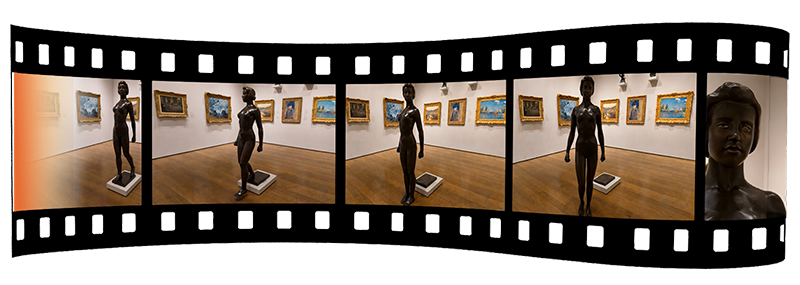
Frames from a Generated Video
Frustration Happens Even on Paid Tiers
Paying doesn’t make the frustration go away. It just makes it more expensive. Here’s a partial list of what could go wrong.
Credits vanishing on failures. Users keep complaining about burning their credits on generations that fail or come back as garbage. Surprise! No refunds allowed. Imagine a restaurant charging you for the meal they dropped on the floor.
Moderation misfires. On Grok Imagine, generations that fail moderation still count against paid usage, even for prompts that seem perfectly innocent. Your image is of a nude sculpture. Sorry! That’s against “community standards.” The robot’s nervous about “how things might look” and you get penalized.
Cost shocks. Reddit users described a single 15-second clip eating about 70% of some Runway AI Video Generator user credits. Seventy percent! For fifteen seconds!
Static output. Some Firefly users say their animations barely animate across several models. You asked for a video and got a slideshow that just doesn’t make the cut.
Weak customer support. This complaint turns a bad generation into a bad week. One Reddit user warned others that Artlist.io won’t refund you after a text-to-video run goes badly, and told people to “save your money.” Elsewhere, a paying Hailuo AI customer said 60 credits disappeared on a video that never generated, and support never answered.
Practical Fixes
You can’t fix the models, but you can change how you use them. Here’s what’s worked for me.
One shot, one action, one camera move. That’s the whole mantra. If you catch yourself writing “and then,” begin a new clip.
Strong still images that aren’t re-described. If the picture already shows a woman in a red coat, don’t tell the model about the red coat. Re-describing invites it to reinterpret what you already nailed.
Positive instructions. “Calm, steady camera” beats a giant list of things you don’t want. If you mix in negative lists, the model can get confused.
Use of the negative prompt field. Y u got it, use it. That’s what it’s there for. For me, it works every time.
Draft cheap. Spend premium credits only on your keeper clip. (This applies mostly to paid users.)
Don’t resubmit “stuck” jobs. They’re often sitting in an unlabeled job state. Resubmitting them just adds a duplicate. Wait it out. It’s cheaper.
Assemble short, reliable clips in your RLE editor. Stop demanding long scenes from the model. Stitch it together yourself in programs like Davinci Resolve. Like real filmmakers do.
Predictions for a Year from Now
I generally don’t like speculating, but users want to knoq, so here’s what might occur in a year.
Reliable character and outfit memory across multiple shots is the top user request, so I expect it to arrive eventually. Outfit memory is a model’s ability to maintain visual consistency over a multi-image generation sequence
Native audio and longer clips should become baseline features instead of upsells.
And better outfit memory. No more “amnesia.” Wouldn’t it be nice if a model could “remember” the exact geometry, textures, and details of an outfit across different scenes, poses, and lighting environments? This would enable you to edit existing clips instead of rerolling the dice every time and hoping for the besrt.
Pricing pressure could help spur reforms. Refunds for failed runs and clearer explanations when moderation says “no!” would be two big wins. Competition could force that to happen, but these days, don’t bet on it. At best, the marketplace is an unreliable ally. This could arrive, but we are not sure when.
And for hobbyists who hate credit meters, stronger open models are coming. If that’s you, look into downloadable open-source interfaces like Pinokio, which let you run things on your own machine. I used an open model on my naked statue video. I coddled it according to the instructions I’ve giving you, and it worked.
Conclusion
Think of your video generator as a talented but easily distracted film crew. Give it simple direction, and expect retakes.
Ask less of each prompt. Start from images. Budget for iteration. That’s the whole game.
Now it’s your turn. What’s the best result you’ve ever gotten, and what’s the worst? Tell me in the comments. Don’t hold back on any horror stories. I promise to laugh with you, not at you. (Mostly.)
Here is my final result, which, to be honest, did take me longer than I expected.
My Animated Statue Video
Here is my animated statue of “Venus (sans collier).”

